

Los ntawm "zoo nkaus li" mus rau "sab hauv", nkag siab txheeb xyuas qhov muaj pes tsawg leeg ntawm TWS headphones
TWS earphones yog ib yam khoom nrov heev hauv kev lag luam khoom siv hluav taws xob tam sim no. Cov xov tooj ntawm tes, cov tuam txhab tsim suab ib txwm muaj, thiab cov npe TWS pob ntseg tshiab tau nthuav tawm cov khoom tshiab tas li. Nrog rau kev txhim kho cov khoom ua tau zoo thiab kev ua kom muaj txiaj ntsig ntawm kev ua haujlwm tas mus li, nws tau lees paub los ntawm ntau thiab ntau tus neeg siv khoom, cov neeg siv khoom nrov nrov, thiab kev lag luam txuas ntxiv nthuav dav.
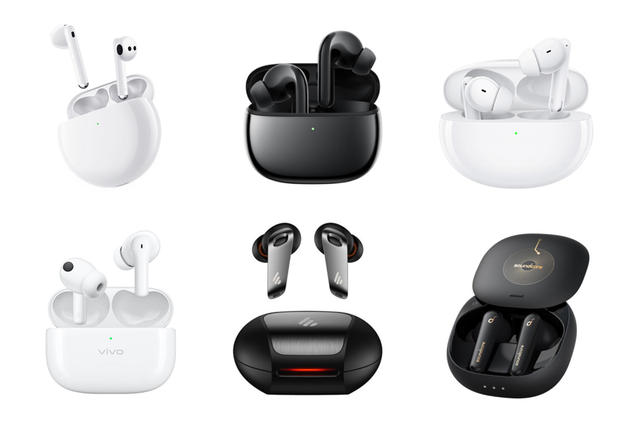
Txoj kev loj hlob sai ntawm TWS pob ntseg kuj tau ua rau muaj kev loj hlob sai ntawm kev muag khoom hauv kev lag luam sib txuas xws li cov chips tseem ceeb, tswj fais fab ICs, wireless charging receiver chips, charging box batteries, earbud batteries, thiab sensors. Txhawm rau txhim kho kev lag luam kev sib tw ntxiv, cov khoom lag luam cuam tshuam txog kev lag luam tau hloov kho tas li, uas tau txhawb nqa kev txhim kho ntawm kev ua tau zoo, kev ua haujlwm, thiab zoo ntawm TWS earphones, thiab tsim lub voj voog tsim txiaj los txhawb kev ruaj khov thiab kev noj qab haus huv ntawm TWS earphones. kev ua lag luam.
Kuv Hlub Suab Network tseem ua tib zoo mloog rau TWS lub mloog pob ntseg ua lag luam, qhia tawm cov ntaub ntawv tshaj tawm kev lag luam thiab cov khoom lag luam xov xwm rau cov phooj ywg hauv lub sijhawm tiag tiag, thiab tau tshaj tawm ze li 300 cov ntaub ntawv tshaj tawm. Thiab lub sijhawm no, Kuv nyiam ua kom tiav cov npe ntawm TWS pob ntseg rau txhua tus raws li kev rhuav tshem, thiab saib seb yuav tsum muaj pes tsawg feem los tsim TWS earphone ~
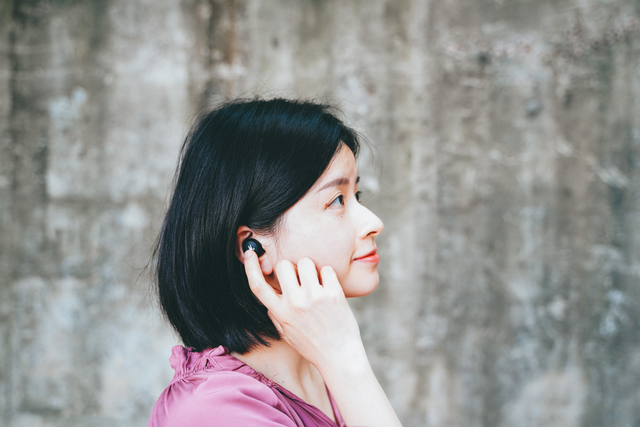
1. Kev txhais lus ntawm TWS headset khoom
TWS earphones yog True Wireless Stereo earphones, uas tau tso tseg txoj kev sib txuas ntawm cov xov hlau sab nraud, thiab feem ntau paub txog kev xa xov wireless los ntawm Bluetooth technology. Lub luag haujlwm tseem ceeb yog mloog nkauj, hais lus, saib yeeb yaj kiab, ua si, thiab lwm yam, thiab nws kuj muaj peev xwm nqa tau ntau lub portals yav tom ntej.
Hais txog cov khoom lag luam, qhov tseem ceeb tshaj plaws ntawm TWS earphones yog tias ob lub pob ntseg muaj nyob ntawm nws tus kheej, tsis muaj cov xaim txuas nrog cov khoom siv txawb lossis cov xaim txuas ntawm ob lub pob ntseg. Nws zam tag nrho cov shackles ntawm cov xov hlau thiab tuaj yeem hnav ntawm ob lub pob ntseg, nqa qhov hloov tau yooj yim thiab yooj yim hnav.
Hais txog kev tsim qauv, cov khoom lag luam tseem ceeb ntawm kev ua lag luam tam sim no tau txais ob daim ntawv "kuav" thiab "taum hom". Qee cov khoom lag luam feem ntau hauv kev lag luam kis las siv lub pob ntseg ruaj khov dua, nrog rau cov pob txha taub hau hauv qab Koj. Cim pob ntseg clip tsim.
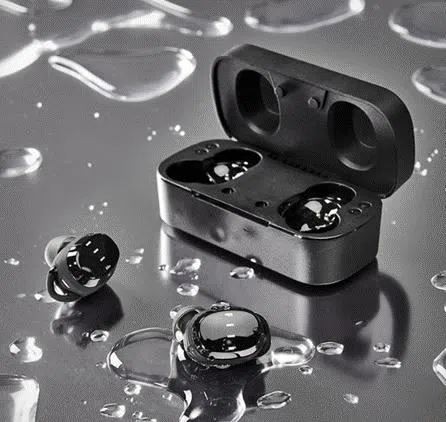
Ntxiv nrog rau txoj kev hnav yooj yim, lwm qhov laj thawj rau qhov nrov nrov ntawm TWS pob ntseg yog kev koom tes zoo tshaj plaws ntawm cov xov tooj ntawm tes thiab cov xov tooj ntawm tes, nrog rau kev ua haujlwm nplua nuj piv rau cov pob ntseg ib txwm muaj.
Thaum pib ntawm nws yug los, TWS headset raug thuam rau nws lub suab zoo, roj teeb lub neej, ncua sij hawm, thiab lwm yam teeb meem, tab sis kev hnav yooj yim thiab kev hnav khaub ncaws hnav thiab tsim qauv tsis muaj xov hlau tau txais thawj pawg neeg siv. Nrog rau kev nce qib txuas ntxiv ntawm cov thev naus laus zis ntsig txog, kev ua tau zoo ntawm TWS lub mloog pob ntseg tau maj mam txhim kho, thiab cov neeg siv pab pawg kuj tau pib nce rau ntawm qhov loj.
Hauv ob xyoos dhau los, qhov sib ntxiv ntawm ntau txoj haujlwm tshiab xws li txo qis suab nrov, hu suab nrov txo, spatial suab cuam tshuam, wireless charging, hom kev ua si, thiab lwm yam tau txhim kho cov kev paub ntawm kev siv TWS headphones, thiab kev muag khoom ntawm TWS headphones. tau nce sai heev. Tam sim no, taug kev ntawm txoj kev thiab kev thauj mus los rau pej xeem, TWS headphones tau dhau los ua cov khoom nrov tshaj plaws xws li xov tooj ntawm tes.

Raws li cov khoom siv suab, qhov tseem ceeb tshaj plaws ntawm TWS headphones tseem ua tau raws li cov kev xav tau ntawm cov neeg siv rau kev ua suab paj nruag hauv kev lom zem thiab lom zem, kev mus ncig, chaw ua haujlwm, thiab lwm yam xwm txheej. Nrog kev nce ntawm cov video luv luv, daim ntawv thov ntawm TWS headsets hauv kev saib yeeb yaj kiab kuj loj hlob sai.
Qhov sib ntxiv ntawm kev hu lub suab nrov txo kev ua haujlwm ua rau lub mloog pob ntseg nyob deb ntawm lub qhov ncauj, tab sis nws kuj tuaj yeem muab cov txiaj ntsig zoo rau kev hu, ntxiv rau kev hu xov tooj yooj yim, ua rau nws yuav tsum muaj cov khoom lag luam rau ntau tus neeg ua lag luam; thiab lub suab nrov txo kev ua haujlwm tau txhim kho ntxiv. Qhov kev paub ntawm kev siv TWS lub mloog pob ntseg tseem tuaj yeem muab cov neeg siv nrog lub suab meej thiab cov yeeb yaj kiab hauv qhov chaw nrov nrov.
Kev txiav txim siab los ntawm cov qauv tam sim no ntawm kev ua haujlwm ntawm TWS headsets, kev ua haujlwm xws li kev saib xyuas kev noj qab haus huv thiab kev ua kis las kuj tseem yuav nruab rau yav tom ntej. Thiab nws kuj tseem tuaj yeem dhau los ua cov khoom lag luam ywj pheej nrog kev txhim kho thev naus laus zis, thiab lub suab playback tuaj yeem ua tiav yam tsis tau txuas mus rau lub cuab yeej suab kawg. Thiab dhau los ua qhov chaw nkag ntawm Is Taws Nem ntawm Yam, nthuav dav daim ntawv thov nplua nuj scenarios.
2. Txhais lus ntawm TWS earphone
Los ntawm cov khoom tsim, kev tsim qauv, thiab kev ua haujlwm ntawm TWS earphones saum toj no, kuv tau tham txog vim li cas TWS pob ntseg tau dhau los ua neeg nyiam nyob rau xyoo tas los no, thiab tau dhau los ua cov khoom yuav tsum muaj rau tib neeg. Cia wb mus saib seb qhov twg yuav tsum tau tsim kom muaj TWS headset txij thaum pib mus txog thaum xaus.
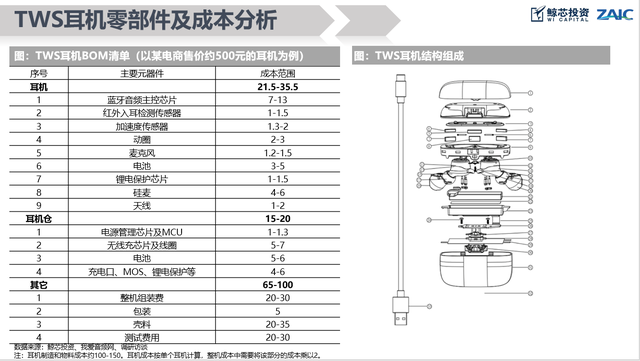
Tam sim no, cov khoom tseem ceeb TWS pob ntseg ntawm kev ua lag luam yog tsim los ntawm lub thawv them nyiaj thiab ob lub pob ntseg sab laug thiab sab xis. Cov khoom ntawm lub thawv them nyiaj uas tsis yog lub plhaub feem ntau suav nrog lub hwj chim tswj nti thiab MCU, roj teeb, lub zog nkag interface, lithium roj teeb tiv thaiv IC, MOS, wireless charging tau txais kauj thiab nti (txhawb wireless charging muaj nuj nqi), nrog rau nqa thiab txuas cov khoom no PCB boards, FPC cables, thiab cov xov hlau, thiab lwm yam.
Cov khoom tseem ceeb ntawm lub mloog pob ntseg muaj xws li hais lus, roj teeb, microphones, kav hlau txais xov, nyob rau hauv-pob ntseg ntes sensors, kov sensors, acceleration sensors, Bluetooth lub ntsiab tswj nti, suab nrov txo nti (txhawb lub suab nrov txo), lithium roj teeb tiv thaiv IC, kev pab cuam nco. , thiab lwm yam. Vim tias muaj ob lub pob ntseg, tag nrho cov khoom yuav tsum tau teeb tsa ua khub.
1. TWS earphone accessories
Charge Cable
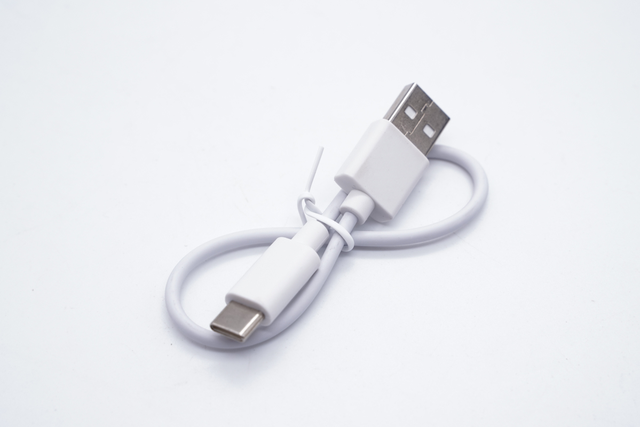
Feem ntau ntawm cov khoom siv tam sim no TWS headset charging cables tau hloov kho rau Type-C charging interfaces, thiab tsuas yog ob peb yam khoom qub tseem siv Micro USB interface. Hom-C them cable yog sib xws nrog cov khoom siv mobile xws li Android xov tooj, khoos phis tawj, thiab ntsiav tshuaj. Tsuas yog ib txheej ntawm cov khoom siv them nyiaj yuav tsum tau nqa tawm, uas txhim kho qhov yooj yim.
pob ntseg
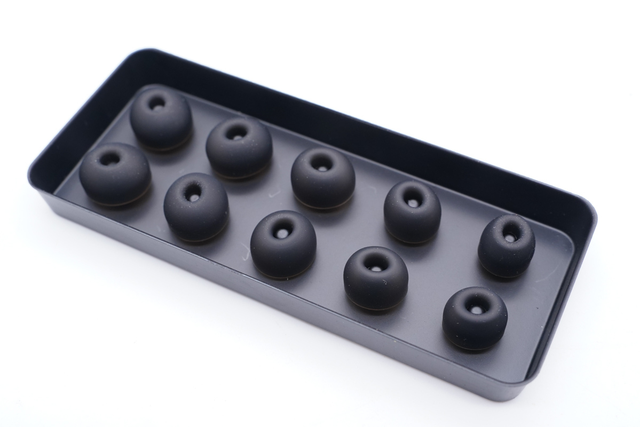
Earplugs yog cov khoom siv rau hauv pob ntseg pob ntseg. Cov earplugs nkag mus tob rau hauv pob ntseg kwj dej, tsim qhov chaw kaw hauv pob ntseg, txhim kho suab nrov txo kev ua haujlwm, muab kev mloog zoo dua, thiab txhim kho kev hnav zoo.
TWS earphones tam sim no feem ntau yog nruab nrog loj, nruab nrab, thiab me me kom tau raws li pob ntseg kwj dej ntawm cov neeg siv sib txawv. Txawm li cas los xij, tseem muaj ntau yam khoom lag luam nruab nrog lub pob ntseg ntawm ntau qhov ntau thiab tsawg los txhim kho cov neeg siv kev hnav khaub ncaws.
2. TWS earphone charging box
pwm

Pwm yog ib feem tseem ceeb ntawm cov txheej txheem tsim ntawm TWS earphones. Tsis zoo li cov pob ntseg tsis muaj npe, uas tuaj yeem siv cov txiv neej pheej yig pwm pwm, hom earphones feem ntau yog kho los yog yuav tawm ncaj qha, yog li tsim qhov sib txawv ntawm lwm yam khoom. Txhim kho kev sib tw.
Kev txhim kho ntawm lub pob ntseg pob ntseg yuav sib txawv ntawm tus nqi raws li cov khoom siv sib txawv, xws li txij li 500, 000 mus rau 1 lab thiab 2 lab. Qhov zoo ntawm pwm ncaj qha cuam tshuam rau kev ua haujlwm ruaj khov ntawm cov khoom thiab cov neeg siv kev paub.
Charging case cover ncej, hlau nplaum

Cov qauv ncej ntawm lub thawv them nyiaj thiab cov hlau nplaum feem ntau yog siv hauv cov qauv hloov npog ntawm lub thawv them nyiaj hauv TWS pob ntseg. Ob leeg ua lub luag haujlwm ua ke. Nrog rau lub caij Hall, qhov kev sib txuas tsis siv neeg / kev cuam tshuam ntawm lub pob ntseg kuj pom tau.
Flagship-theem nruab nrab-rau-high-end khoom ua tau zoo nyob rau hauv no hais txog thiab feem ntau siv ib tug nyias hlau ncej qauv los txhim kho lub zog thiab kev pab cuam lub neej. Nrog rau qhov attraction / repulsion ntawm cov hlau nplaum, qhov hloov tau zoo li du thiab xis, tsis yooj yim rau kaw cia, thiab cov qauv ruaj khov heev tom qab kaw lub hau. Cov khoom siv qis kawg feem ntau siv cov qauv sib xyaw ua ke, uas yooj yim rau kev qhib thiab kaw lub hau, thiab qee cov khoom muaj cov qauv xoob.
PCB luam tawm Circuit Board
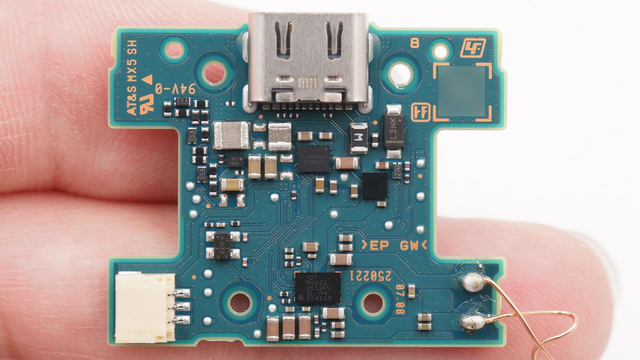
Printed circuit boards, tseem hu ua printed circuit boards, yog cov khoom siv hluav taws xob sib txuas rau cov khoom siv hluav taws xob. TWS headphones no exception. Lub ntsiab kom zoo dua ntawm kev siv Circuit Court boards yog kom txo tau cov xaim thiab kev sib dhos yuam kev, thiab txhim kho qib ntawm automation thiab kev ua haujlwm ntau lawm.
Roj teeb
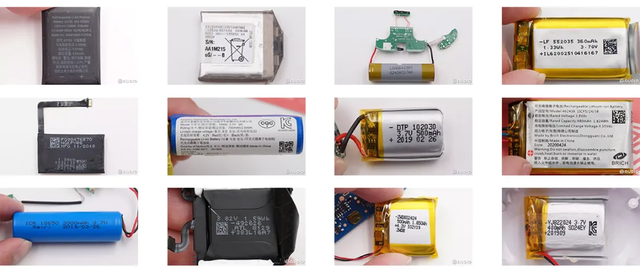
Cov roj teeb nyob rau hauv TWS lub pob ntseg them lub thawv feem ntau yog cov roj teeb pob hluav taws xob polymer, uas feem ntau muab faib ua ob hom: cov roj teeb square soft-pack thiab cylindrical roj teeb, uas yog lub luag haujlwm muab lub zog thaub qab rau lub mloog pob ntseg roj teeb thiab cov khoom siv hluav taws xob sab hauv. them lub thawv. Raws li ib txwm muaj, tsuas yog ib lub roj teeb siv rau hauv lub thawv them, thiab lub peev xwm yog 300-600mAh. Tab sis tam sim no, qee cov khoom lag luam tau pib siv ob lub roj teeb kev daws teeb meem, uas tuaj yeem ua kom zoo dua ntawm qhov chaw sab hauv, ua kom lub roj teeb muaj peev xwm, thiab yog li txhim kho tag nrho cov roj teeb lub neej.
them nyiaj interface
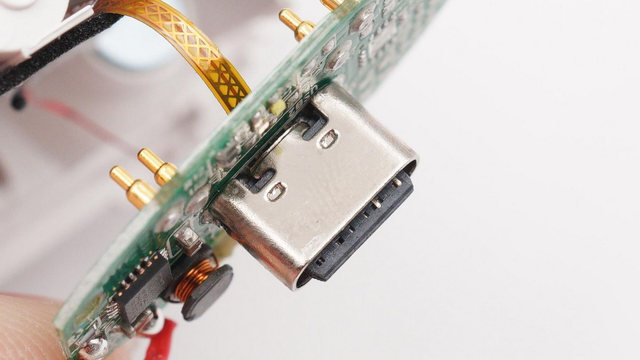
USB Hom-C yog qhov tseeb USB interface zoo li tus qauv. Hom-C interface muaj qhov zoo ntawm qhov me me thiab tuaj yeem siv tsis hais pem hauv ntej thiab nraub qaum. Nws muaj zog versatility nyob rau hauv tam sim no cov neeg siv khoom electronics lag luam. Yog li ntawd, cov khoom tshiab TWS pob ntseg tau hloov kho rau Hom-C interface, thiab tsuas yog ob peb yam khoom qub ntawm kev muag khoom muaj Micro USB interface.
hwj chim tswj chip
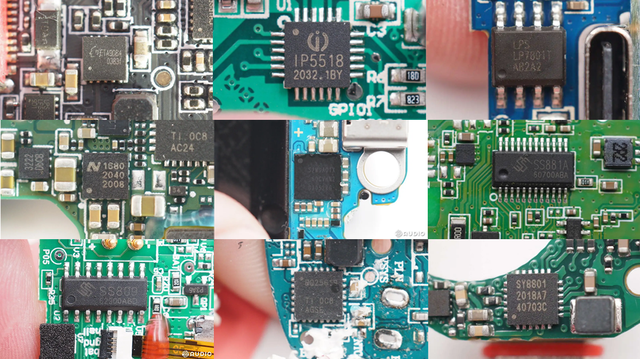
Lub hwj chim tswj nti tau nruab rau hauv TWS lub mloog pob ntseg, uas feem ntau ua haujlwm ob lub luag haujlwm: ib qho yog lub luag haujlwm rau kev them lub roj teeb hauv lub charger compartment, thiab lwm yam yog lub luag haujlwm rau kev txhawb nqa lub roj teeb hauv lub charger kom them lub mloog pob ntseg. . Tsis tas li ntawd, nws tseem yuav tsum tau siv kev tiv thaiv kev nyab xeeb los tiv thaiv cov roj teeb lithium built-in los ntawm overcharging, over-discharge, overcurrent, short circuit, thiab lwm yam kev tiv thaiv.
Lub hwj chim tswj chipset muaj xws li ib tug them nti, synchronous rectification boost converter, tsis tshua muaj dropout voltage regulator, load hloov, input overvoltage, overcurrent tiv thaiv nti, thiab lwm yam. Muaj peb hom kev tswj fais fab chips: cov tsoos tshuaj ntawm PMIC ntxiv rau lub hom phiaj. MCU, cov kev daws teeb meem tag nrho ntawm lub charger ntxiv rau kev txhawb nqa ntxiv rau MCU ib leeg-chip, thiab kev daws teeb meem ntawm ib qho-chip charger ntxiv rau MCU thiab plug-in boost.
Kev them nyiaj yug MCU
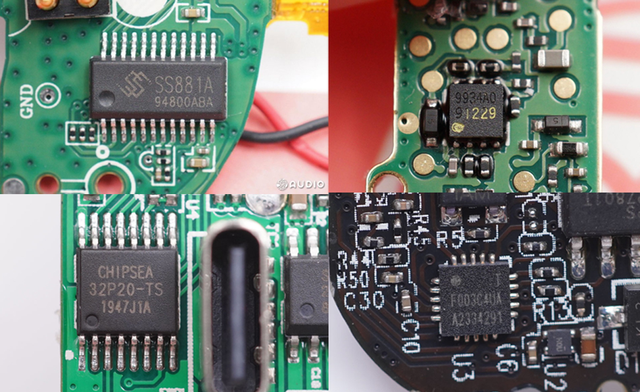
MCU yog (Microcontroller Unit) micro-control unit. Lub luag haujlwm tseem ceeb ntawm TWS lub mloog pob ntseg them rau hauv MCU yog: kev tswj hwm kev them nyiaj (them nyiaj ntxiv rau kev txhawb nqa), kev sib cuam tshuam ntawm lub hauv paus thiab lub mloog pob ntseg (kev sib txuas lus, kev sib txuas ntawm Bluetooth), thiab kev sib cuam tshuam ntawm lub hauv paus thiab lub xov tooj ntawm tes (qhov tseeb lub hwj chim. -up qhov rais qhia, siv Bluetooth rau cov ntaub ntawv pob tshab kis tau tus mob), wireless charging.
Lithium roj teeb tiv thaiv nti

Lub lithium roj teeb tiv thaiv nti feem ntau paub txog kev tiv thaiv overcharge, tshaj tawm, thiab overcurrent ntawm lub roj teeb los ntawm kev kuaj xyuas qhov voltage thiab tam sim no ntawm lub roj teeb kom ntseeg tau tias kev siv nyab xeeb thiab ruaj khov.
Connector: BTB connector, hlau dome, hlau pogo pin
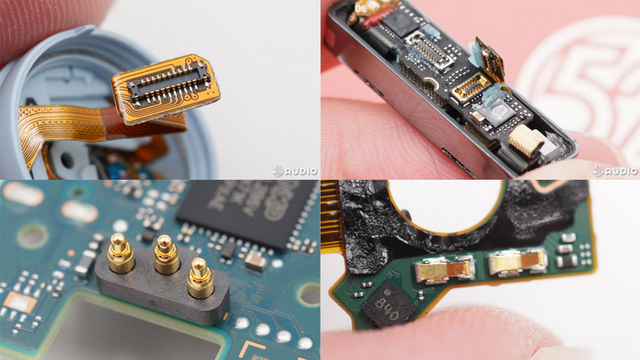
Lub connector yog lub cuab yeej uas txuas ntau yam khoom hauv TWS headset. Los ntawm kev sib txuas ntawm cov khoom sib txuas no, TWS headset tuaj yeem paub txog kev sib txuas ua haujlwm ntawm ntau yam khoom. Tam sim no, cov khoom siv hauv TWS earphones feem ntau suav nrog BTB connectors, hlau shrapnel, hlau thimbles, thiab lwm yam. Raws li cov khoom sib txuas sib txawv, cov khoom siv zoo tshaj plaws yog siv, uas txo cov zog thiab yooj yim rau kev kuaj xyuas.
Wireless charging receiver coil (txhawb wireless charging khoom)
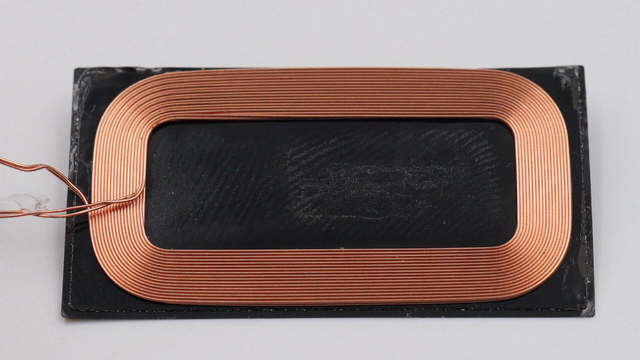
Kev them nyiaj wireless yog qhov tshwj xeeb uas ntau qhov nruab nrab-rau-siab-kawg cov khoom lag luam yuav nqa, muab cov neeg siv nrog kev paub yooj yim dua. Lub wireless charging module feem ntau yog tsim los ntawm lub wireless charging tau txais kauj thiab lub chip txais.
Lub xaim hluav taws xob ntawm lub wireless charger tsim ib qho tam sim no hauv qhov tau txais kauj los ntawm electromagnetic induction nyhuv raws li qee zaus ntawm kev hloov tam sim no, hloov lub zog hluav taws xob los ntawm kev xa mus rau qhov kawg tau txais, nrog lub wireless charging tau txais nti. , thiab tom qab ntawd them lub roj teeb nyob rau hauv TWS charging box powered by.
Wireless charging chip (txhawb wireless charging khoom)
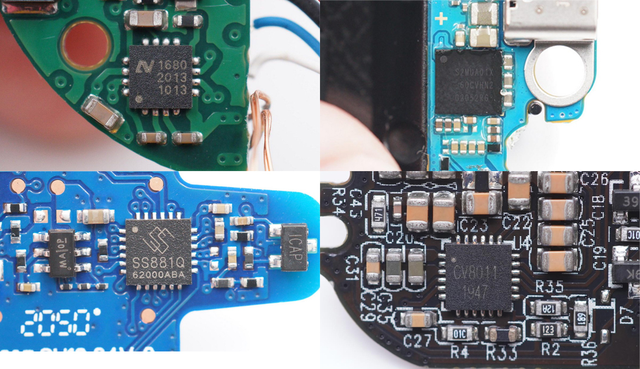
Lub wireless charging nti yog lub hwj chim tswj nti rau wireless input zog. Nws koom ua ke ntawm chav them nqi thiab kev tswj fais fab thiab kev tiv thaiv kev ua haujlwm. Nws tau nruab nrog lub wireless charging tau txais kauj kom paub txog lub wireless charging muaj nuj nqi rau TWS earphone charging box.
Hall element
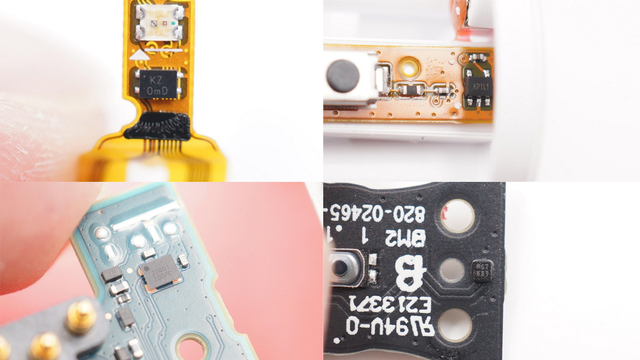
Hall siv nyob rau hauv TWS earphones mas plays lub luag hauj lwm ntawm kev twb kev txuas tsis siv neeg kev twb kev txuas thiab tsis siv neeg disconnection ntawm lub hau hloov, uas yog heev yooj yim accessory txhawb rau TWS earphones. Lub ntsiab lus Hall pom qhov sib nqus hloov pauv thaum lub hau ntawm lub thawv them nyiaj qhib thiab kaw, thiab tom qab ntawd ceeb toom lub thawv them nyiaj MCU thiab lub mloog pob ntseg kom ua khub lossis txiav tawm ntawm lub cuab yeej txuas.
Qhov taw qhia lub teeb
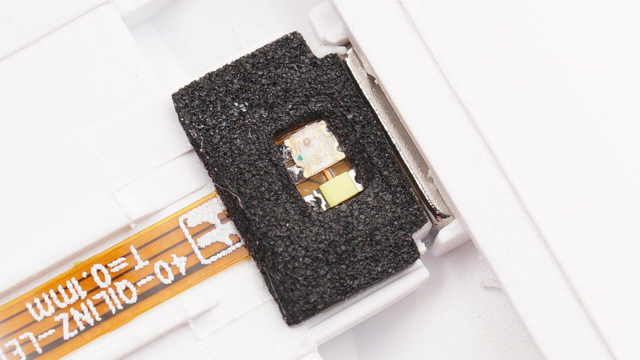
Qhov taw qhia lub teeb yog siv rau TWS lub mloog pob ntseg them lub thawv rau kev tawm tswv yim ntawm lub zog ntxiv, kev them nyiaj, thiab lwm yam haujlwm, uas feem ntau yog qhov txawv ntawm tus lej, xim sib txawv, thiab flickering zaus.
3. Lub mloog pob ntseg
Cov khoom xws li pwm, hlau nplaum, PCBs, cov khoom sib txuas, cov ntsuas LED, them ICs, thiab lithium roj teeb tiv thaiv ICs hauv lub pob ntseg muaj cov haujlwm zoo ib yam li cov hauv lub thawv them, thiab yuav tsis piav qhia hauv qab no. Feem ntau pom dab tsi yog cov khoom sib txawv ntawm lub thawv them ~
pwm

TWS earphone pwm tau hais los saum toj no, yog li kuv yuav tsis mus rau hauv cov ntsiab lus ntawm no. Qhov txawv ntawm lub thawv them nyiaj yog tias lub pob ntseg pob ntseg tau muab faib ua pob ntseg sab laug thiab sab xis, thiab vim qhov sib txawv ntawm kev coj ntawm lub pob ntseg sab laug thiab sab xis, sab laug thiab sab xis earmolds yuav tsum tau tsim sib cais, thiab feem ntau ntawm lawv yog cov qauv sib xyaw. .
suab unit
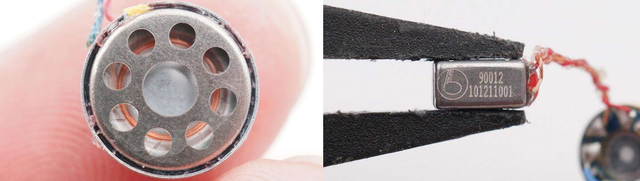
Hauv TWS lub mloog pob ntseg, lub suab nrov ua lub luag haujlwm ntawm kev hloov hluav taws xob cov teeb liab rau hauv cov suab paj nruag, feem ntau suav nrog kev txav coil thiab txav hlau. Ob lub suab nrov no yuav muab ua ke lossis siv nws tus kheej. Tus naj npawb ntawm cov khoom siv yuav nce lossis txo raws li lub suab zoo ntawm lub mloog pob ntseg, xws li cov kev daws teeb meem sib txawv xws li ib qho kev ua haujlwm kauj, ib qho kev ua hlau, thiab ob txoj haujlwm hlau. Tsis tas li ntawd, cov kev daws teeb meem tshwm sim xws li lub nplhaib hlau modules thiab txav cov neeg hais lus porcelain kuj tau tshwm sim hauv khw.
MEMS microphone
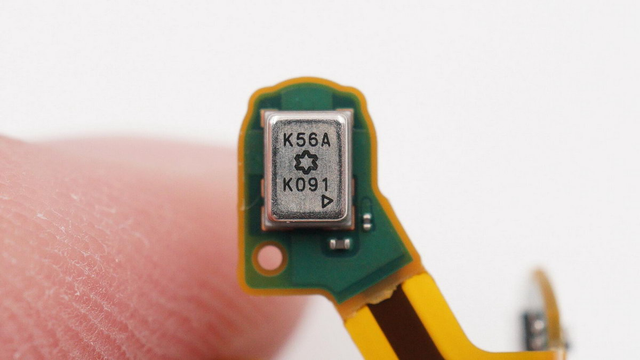
MEMS microphone yog ib qho acoustic sensor uas siv MEMS thev naus laus zis los hloov cov teeb liab acoustic rau hauv cov teeb liab hluav taws xob. Nws txoj haujlwm hauv TWS earphones feem ntau yog rau lub suab khaws. Nrog rau lub suab nrov txo cov algorithms, nws muab cov neeg siv nrog lub suab nrov nrov thiab raug AI. Lub suab tswj thiab ua kom nrov nrov tshem tawm.
Roj teeb
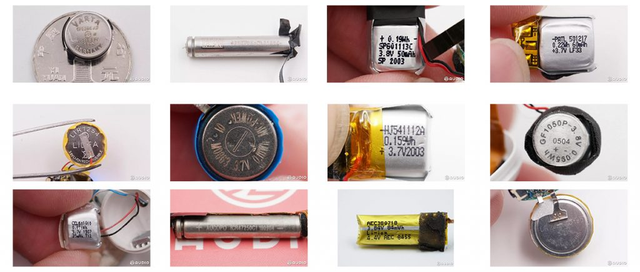
Ob lub pob ntseg ntawm TWS earphones xav tau cov roj teeb built-in. Txhawm rau hloov mus rau ntau hom pob ntseg, cov roj teeb feem ntau muab faib ua peb hom. Muaj peb hom polymer roj teeb pob, khawm roj teeb, thiab rab koob roj teeb, uas tsim nyog rau kev tsim qauv sib txawv, nrog lub peev xwm ntawm 30-60mAh, thiab yog siv rau hauv circuits, hais lus, thiab lwm yam khoom.
Bluetooth kav hlau txais xov
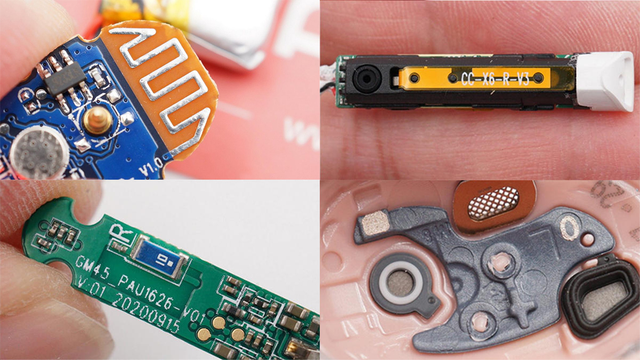
Tus kav hlau txais xov yog ib qho tseem ceeb ua haujlwm ntawm TWS headset kom ua tiav kev sib txuas wireless. Nws tsuas yog hloov cov hluav taws xob ntau zaus tam sim no los ntawm Bluetooth nti rau hauv cov hluav taws xob hluav taws xob rau hluav taws xob, lossis hloov chaw hluav taws xob hluav taws xob yoj teeb liab mus rau lub zog tam sim no thiab xa mus rau lub receiver. Cov kav hlau txais xov Bluetooth tseem ceeb siv hauv TWS headsets suav nrog cov kav hlau txais xov luam tawm, FPC kav hlau txais xov, kav hlau txais xov ceramic, thiab LDS antennas.
In-pob ntseg detection sensor
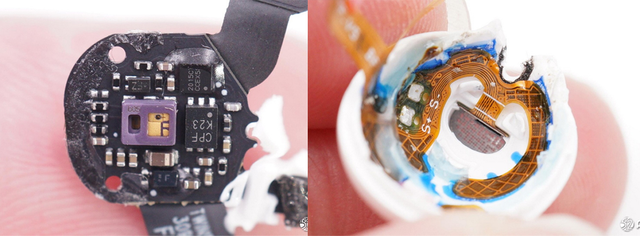
Kev kuaj pom hauv pob ntseg hauv TWS earphones paub txog qhov tsis siv neeg nres thaum lub pob ntseg raug tshem tawm, thiab kev ua haujlwm rov qab yuav rov pib dua thaum lub pob ntseg hnav. Nws kuj yog siv los txheeb xyuas qhov ib leeg / binaural hnav hom hloov, thiab hloov ntawm lub mloog pob ntseg thiab lub xov tooj ntawm tes thaum hu. TWS earphones tam sim no feem ntau pom tau los ntawm kev kho qhov muag infrared laser thiab capacitive induction.
capacitive kov sensor
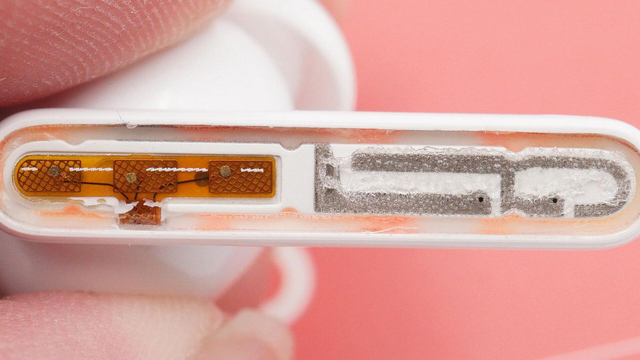
Tam sim no, hauv TWS lub mloog pob ntseg kev lag luam, kev tswj hwm lub mloog pob ntseg feem ntau muaj peb txoj hauv kev: khawm lub cev, khawm khawm, thiab cov nyees khawm siab. Kov cov nyees khawm yog cov kev daws teeb meem siv dav tshaj plaws nyob rau tam sim no, uas tuaj yeem txhawb ntau hom kev tswj hwm ntawm ib zaug-nias, ob-nias, triple-nias, ntev-nias, thiab zawv zawg. Lub Capacitive kov sensor yog cov khoom tivthaiv uas muab kev txhawb nqa rau nws, nrog rau kev kuaj pom IC, kom ua tiav kev tswj hwm ntawm ntau yam haujlwm.
kov ntes nti
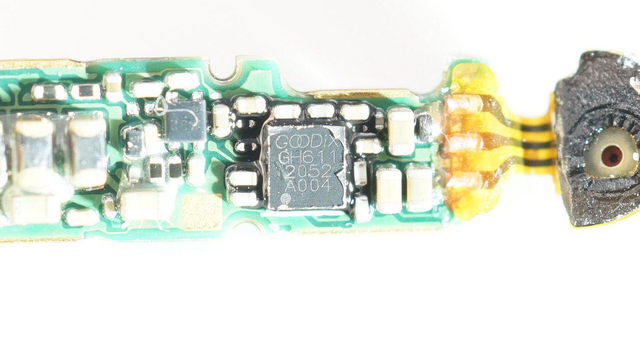
Lub touch detection IC tau hais nyob rau hauv lub capacitive touch sensor. Nws yog tsuas yog siv nyob rau hauv TWS headset los kuaj xyuas lub xeev hloov ntawm lub sensor, qhia nws mus rau lub ntsiab tswj nti, thiab ces tswj lub ntau yam functions los ntawm lub ntsiab tswj. Tam sim no, ntau lub ntsiab tswj chips muaj kev sib koom ua ke kom pom kev ua haujlwm.
Siab-rhiab sensor (txhawb siab-sensitive khawm khoom)
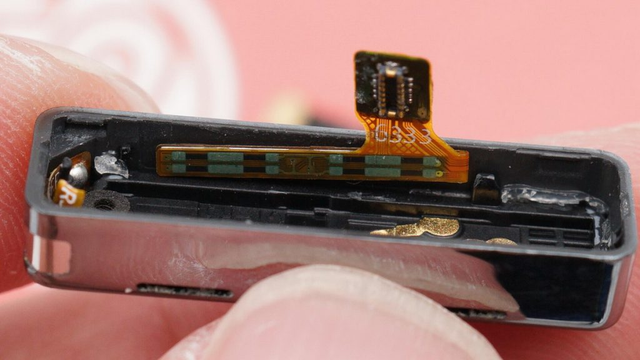
Lub siab sensor yog ib qho kev sib tham ntawm daim ntawv thov tshiab kawg ntawm TWS headset, uas paub txog kev tswj hwm ntawm ntau lub zog los ntawm kev hnov qhov kev hloov ntawm lub siab. Nws muaj qhov tseeb ze ntawm lub cev khawm tab sis tsis tas yuav qhib qhov. Piv nrog rau lub khawm kov, kev tswj hwm yog qhov tseeb dua, thiab nws zam lub stethoscope cuam tshuam los ntawm kev sib tsoo thiab tapping.
Pressure-sensitive nti (txhawb siab-sensitive cov khoom tseem ceeb)
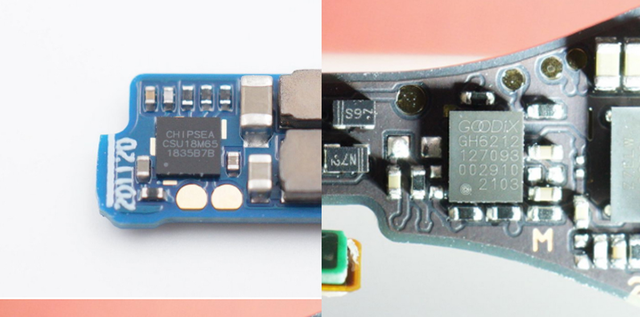
Zoo ib yam li tus kov nrhiav nti tau hais los saum no, nws tsuas yog siv hauv TWS headset cov khoom uas txhawb nqa lub siab-rhiab nyees khawm. Nws yog siv los txheeb xyuas cov xwm txheej ntawm lub siab sensor thiab tshaj tawm rau tus tswj lub ntsiab kom tswj tau ntau yam haujlwm.
pob txha conduction sensor
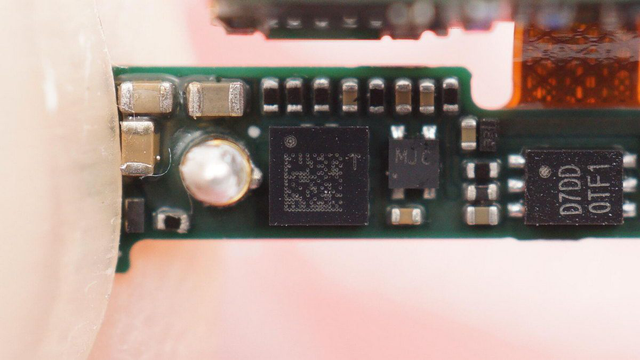
Pob txha conduction sensors feem ntau yog siv hauv qee cov khoom nruab nrab-rau-high-end. Lawv tsuas yog siv kev vibration los txiav txim seb nws puas yog tib neeg lub suab. Lawv yog siv los txo cov suab nrov hauv kev hu. Cov pob txha vibration teeb liab yog ua ke nrog lub microphone teeb liab los txhim kho qhov tseeb ntawm kev hu; nws yog siv rau lub suab sib cuam tshuam, Lub suab tsa lub luag haujlwm los txo cov teeb meem tsis tseeb uas yuav tshwm sim los ntawm lub suab sab nraud, txhim kho
Pob txha conduction sensors feem ntau yog siv hauv qee cov khoom nruab nrab-rau-high-end. Lawv tsuas yog siv kev vibration los txiav txim seb nws puas yog tib neeg lub suab. Lawv yog siv los txo cov suab nrov hauv kev hu. Cov pob txha vibration teeb liab yog ua ke nrog lub microphone teeb liab los txhim kho qhov tseeb ntawm kev hu; nws yog siv rau lub suab sib cuam tshuam, Lub suab tsa suab muaj nuj nqi txo cov teeb meem tsis tseeb uas yuav tshwm sim los ntawm cov suab sab nraud thiab txhim kho qhov tseeb ntawm kev sib cuam tshuam.
Bluetooth Audio SoC
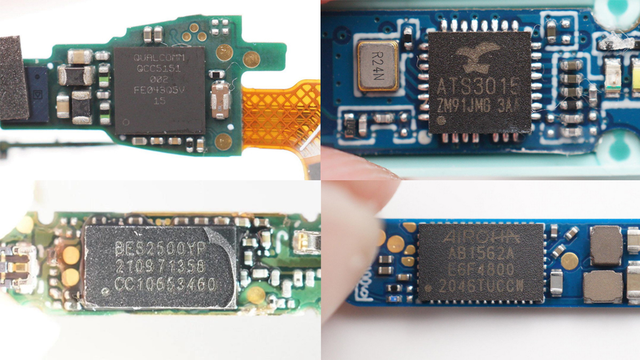
Bluetooth lub ntsiab tswj nti yog qhov tseem ceeb tshaj plaws nyob rau hauv TWS headset. Nws yog lub hauv paus rau TWS lub mloog pob ntseg kom paub txog kev ua haujlwm xws li kev sib txuas wireless, kev ua suab, kev tswj hwm lub mloog pob ntseg, thiab kev sib tham ntse. Nws cov xwm txheej yog sib npaug rau CPU processor hauv lub xov tooj ntawm tes. Lub mloog pob ntseg feem ntau txuas nrog lub xov tooj ntawm tes thiab lwm yam khoom siv rov qab los ntawm Bluetooth thev naus laus zis, thiab lub suab teeb liab xa los ntawm lub davhlau ya nyob twg yog xa mus rau ob lub mloog pob ntseg tib lub sijhawm los ntawm kev saib xyuas, xa mus, kev sib txuas dual-channel, thiab lwm yam qauv tsim. ib tug stereo system.
Lub suab nrov txo nti
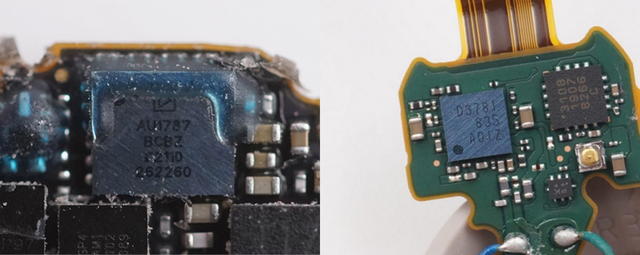
Lub suab nrov txo nti yog siv hauv TWS pob ntseg cov khoom uas txhawb nqa lub suab nrov txo kev ua haujlwm. Nws yog siv los ua cov suab nrov sab nraud uas sau los ntawm lub microphone. Tom qab ua tiav, qhov sib thooj rov qab suab nthwv dej yog tso tawm, thiab tom qab ntawd tus neeg hais lus tawm suab rov qab los tshem tawm lub suab nrov. Txawm li cas los xij, raws li lub ntsiab tswj nti pib sib koom ua ke lub suab nrov txo kev ua haujlwm, lub suab nrov sab nraud txo qis nti yog siv tsawg dua.
khaws cia
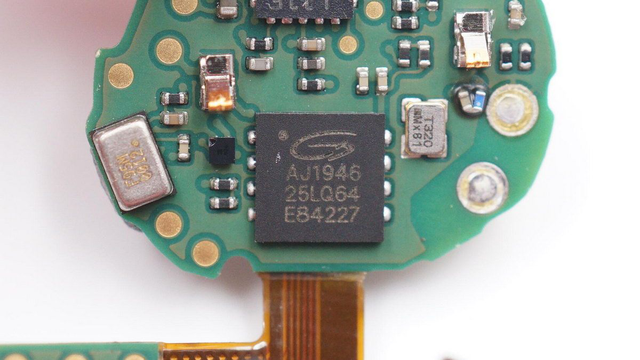
Txij li thaum TWS headsets tam sim no tsuas yog siv nrog cov khoom siv txawb xws li xov tooj ntawm tes, khoos phis tawj, thiab ntsiav tshuaj, tsis tas yuav muaj peev xwm loj hauv. Lub cim xeeb hauv TWS headset feem ntau yog siv los khaws cov ntaub ntawv sib txuas Bluetooth thiab ntau yam haujlwm ua ntej. Tam sim no, cov khoom lag luam feem ntau kuj tau koom ua ke rau hauv lub ntsiab tswj nti.
3. Cov ntsiab lus
Sib txawv ntawm cov khoom siv xov tooj ntawm tes, qhov zoo tshaj plaws thiab compact tsim ntawm TWS earphones ua rau nws tsis yooj yim sua rau cov neeg siv khoom zoo sib xws los ntawm lawv tus kheej thiab kawm ntawm nws tus kheej li cas configurations tau siv nyob rau hauv cov khoom thiab cov kev ua haujlwm zoo sib xws. Raws li ze li ntawm 300 TWS earphone dismantling qhia, lub sij hawm no Kuv Hlub Audio.com tau txheeb nws tawm kom meej rau txhua tus. Txawm hais tias tej zaum yuav muaj kev tso tseg, kuv vam tias nws tuaj yeem pab qee cov phooj ywg uas xav paub ntxiv.
TWS headphones tuaj yeem dhau los ua cov khoom lag luam nrov heev hauv cov neeg siv khoom lag luam tam sim no, thiab lawv cov kev teeb tsa sab hauv muab kev txhawb zog rau lawv. Thiab vim qhov txwv ntawm ntim, cov khoom xav tau kev sib koom ua ke siab heev kom paub txog kev siv ntau yam haujlwm. "Txawm hais tias tus sparrow me me, nws muaj tag nrho cov kab mob hauv nruab nrog cev" tuaj yeem piav qhia txog cov qauv sab hauv thiab teeb tsa ntawm TWS headset.
Nrog rau txoj kev loj hlob sai ntawm TWS pob ntseg thiab kev nce qib ntawm kev siv thev naus laus zis, xws li lub zog tswj nti hauv lub thawv them nyiaj thiab lub ntsiab tswj Bluetooth SoC hauv lub pob ntseg, cov khoom siv me me nyob ib puag ncig tau ua ke tas li, thiab qib kev sib koom ua ke tau txhim kho tas li. , yog li ua rau cov khoom zoo txhim khu kev qha. Kev tswj thiab kev ruaj ntseg kuj zoo dua. Ntawm qhov tod tes, cov haujlwm ntawm TWS lub mloog pob ntseg tau maj mam ua kom zoo, thiab kev sib koom ua ke nrog kev teeb tsa zoo kuj tseem muab chaw rau kev siv cov haujlwm tshiab yav tom ntej.
Los ntawm cov neeg siv kawg qhov kev xav, nws txhais tau hais tias lub suab zoo tau zoo dua qub, kev ncua qeeb, lub roj teeb lub neej ntev dua, thiab cov neeg siv kev paub tau zoo dua thiab zoo dua. Nrog rau kev txhim kho txuas ntxiv ntawm cov haujlwm tshiab xws li kev txo qis suab nrov thiab kev saib xyuas kev noj qab haus huv ntawm cov kis las, daim ntawv thov cov xwm txheej tau nthuav dav tas li, txhim kho cov neeg siv kev paub ntxiv.