

Yuav ua li cas xaiv ib tug haum magnetic charging cable?
Qhov no yog ib tug sib nqus cable nrog peb lub taub hau, uas yog guaranteed kom haum rau feem ntau cov xov tooj ntawm tes nyob rau hauv kev ua lag luam. Lwm qhov tshwj xeeb yog qhov siab tshaj plaws tam sim no uas lub cable tuaj yeem nqa tau yog 3A, uas ua kom ntseeg tau tias cov txheej txheem them ceev ceev ntawm Apple2.4 thiab QC3 tuaj yeem siv tau ib txwm, uas zoo dua li tsis muaj npe cables.
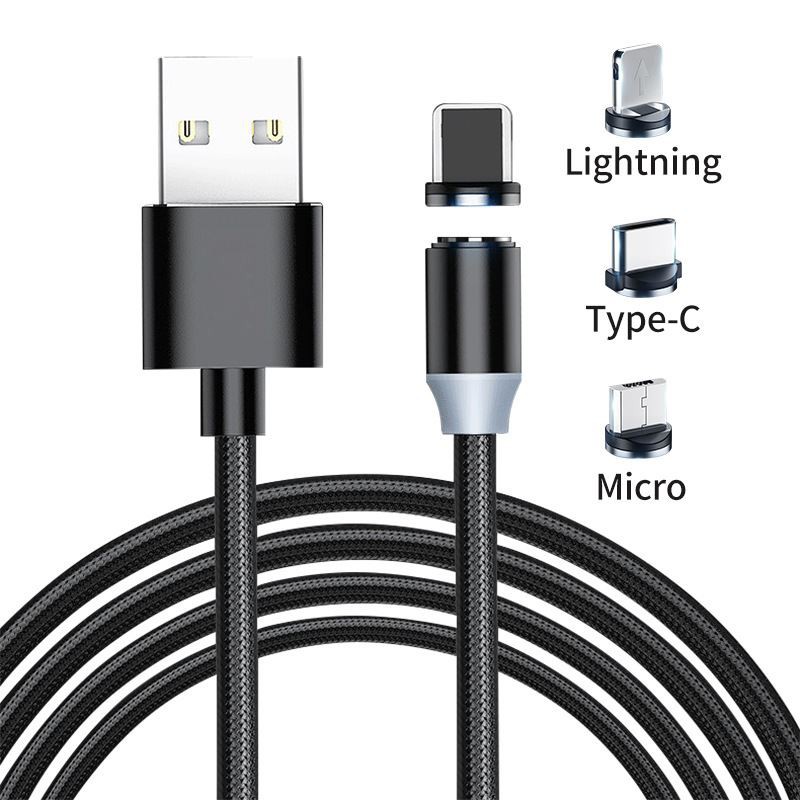
Tom qab qhib lub pob, peb tuaj yeem pom tag nrho cov duab ntawm cov ntaub ntawv cable no. Qhov yooj yim ntawm cov ntaub ntawv sib nqus cable yog qhov tseeb ntau. Thawj yog los txo qhov kev puas tsuaj rau lub xov tooj ntawm tes interface los ntawm kev ntsaws thiab tshem tawm, thiab nws tuaj yeem ua haujlwm yooj yim nrog ib txhais tes, uas yooj yim heev thaum tsav tsheb; thib ob, hauv kev siv tiag tiag, yog tias koj tsis paub lossis tsis nco qab nws. Kev khaws lub xov tooj ntawm tes yuav kuj txo qhov kev puas tsuaj rau lub xov tooj ntawm tes thiab cov ntaub ntawv cable nws tus kheej.

Cov hlau ib feem yog ua los ntawm high-density nylon braided khoom. Cov khoom no muaj qhov yooj yooj yim, tsis yooj yim rau knot, thiab resistant rau pilling. Nws yog tam sim no nyiam ntawm cov ntaub ntawv cables.

USB interface ib feem yog ua los ntawm txhuas alloy cov ntaub ntawv uas muaj anti-oxidation thiab anti-corrosion, thiab SR I-lub taub hau tsim muaj peev xwm tiv taus dabtsi yog khoov, uas tsis txawv los ntawm feem ntau ntawm cov ntaub ntawv cables ntawm Jiletang. Cov pob qij txha raug kho nrog fishtail roj hmab los txhim kho qhov khoov tsis kam.
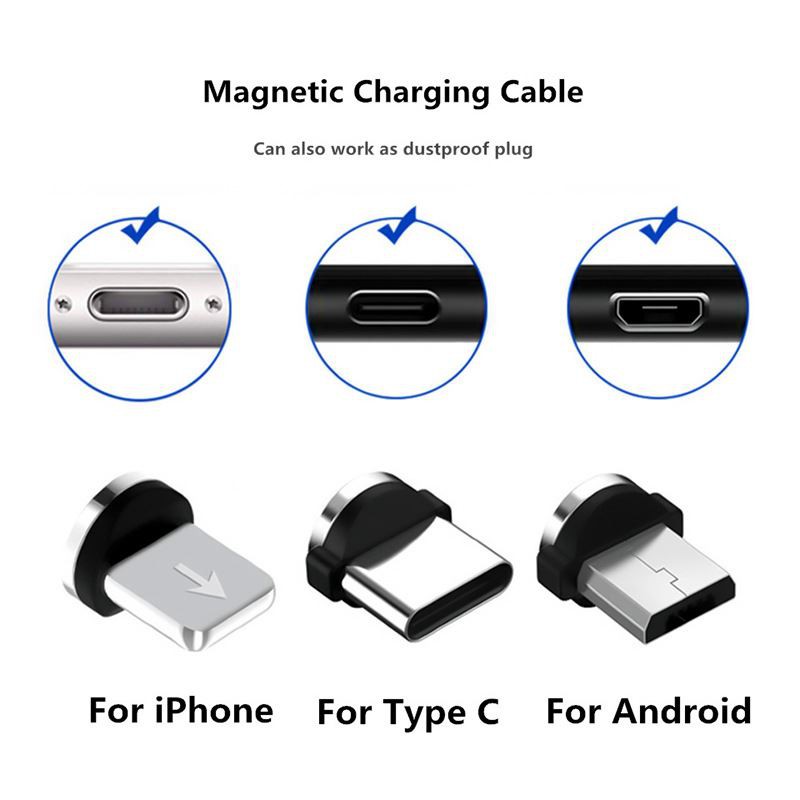
Qhov sib nqus ntawm qhov txuas yog qhov tseem ceeb ntawm cov kab no. Yog tias qhov tsim tsis zoo, nws yuav cuam tshuam rau kev them nyiaj thiab ua rau kub siab. Cov ntaub ntawv cable no tau txais cov qauv ntawm qhov sib txuas thiab txuas nrog tsib pawg ntawm kev sib cuag, uas tuaj yeem txo qhov xwm txheej ntawm kev sib cuag tsis zoo. Thickened PCBA board tuaj yeem tiv thaiv corrosion, zoo thiab tsis zoo adsorption, ruaj khov heev.

Kuj tseem muaj ib lub koom haum detachable ntawm cov ntaub ntawv kab no, uas yog siv los khaws thiab txuag peb cov khoom sib txuas, yog li nws kuj yooj yim heev los nqa tawm. Txawm li cas los xij, txhawm rau kom ntseeg tau tias cov khoom sib txuas tuaj yeem ruaj khov nyob rau hauv tus txheej txheem no, ntxig thiab rub nws tawm yog qhov nyuaj me ntsis thiab yuav tsum muaj qee yam txuj ci.

Peb pob qij txha tuaj yeem ua si zoo li no, nthuav, txoj cai? Koj tuaj yeem ua si nrog cov menyuam yaus thiab lom zem rau lawv.

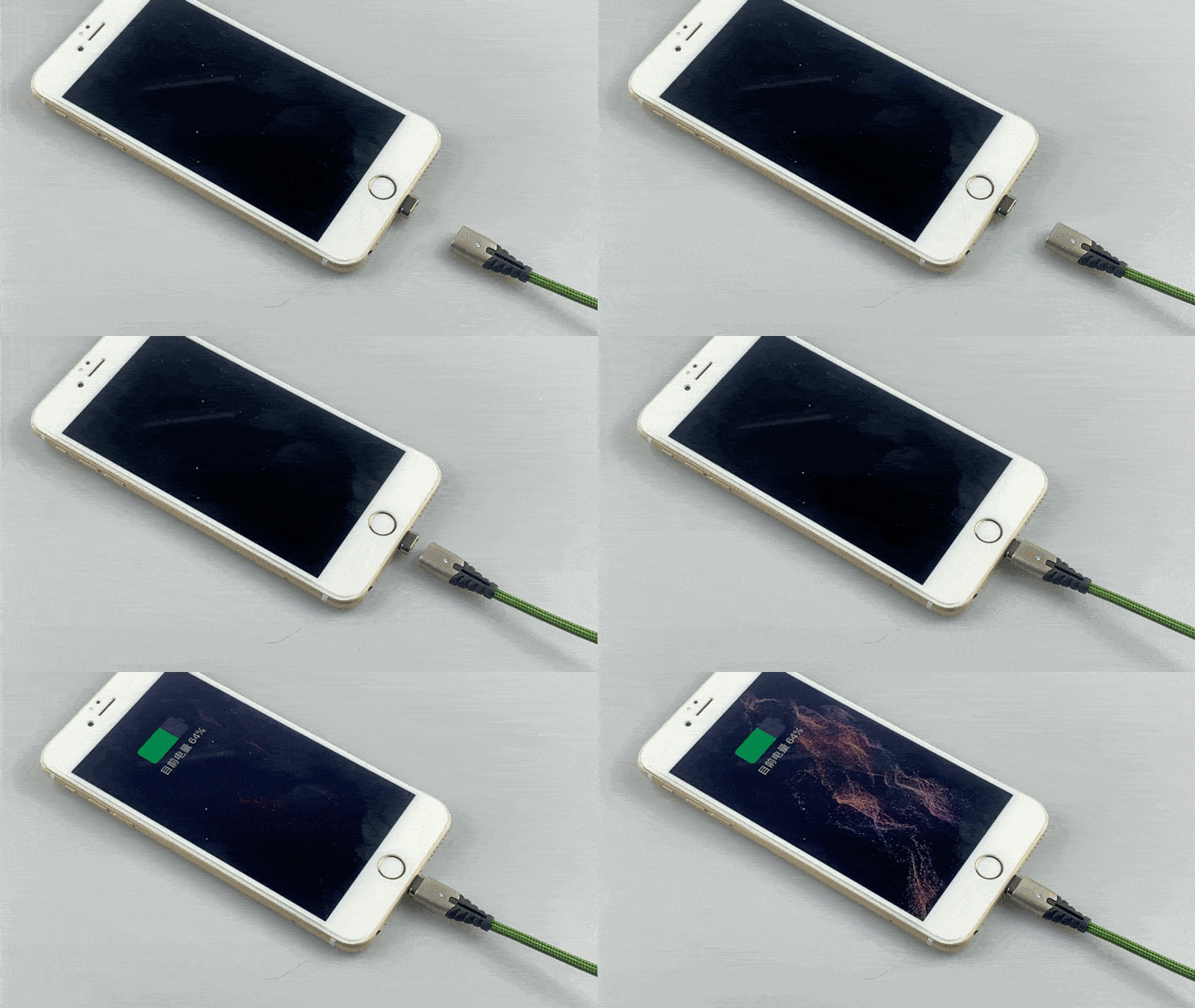
Lub interface tuaj yeem muab tso rau ntawm lub interface ntawm koj lub xov tooj ntawm tes ntev, tab sis muaj qhov me me, uas nyob ntawm tus kheej nyiam. Yog tias nws siv, nws tuaj yeem txuas tau los ntawm kev nqus ncaj qha. Los ntawm cov animation hauv qab no, peb tuaj yeem pom meej tias nws qhov nqus tau muaj zog txaus los rub iPhone 6 Plus, thiab nws tseem ruaj khov.

Tam sim no peb siv KT001 load ntaus ntawv ntawm POWER-Z los ntsuas lub zog tiag tiag. Thawj yog Apple iPhone XS Max, lub zog ntxiv yog 45 feem pua, thiab lub zog ntsuas qhov tseeb txog 9.23W. Vim tias lub xov tooj ntawm tes tam sim no Apple tsuas yog txhawb nqa Apple2.4A thiab PD ob hom kev them nqi ceev, cov ntaub ntawv zoo tib yam tuaj yeem siv Apple2.4A raws tu qauv, koj tsis tas yuav xav txog yog tias koj nyiam PD.
Tom qab ntawd peb sim Huawei P30, lub zog ntxiv yog 66 feem pua, peb tuaj yeem pom tias lub zog mus txog 13.2W, thiab Huawei tus kheej FCP them ceev tau qhib, uas ua tau zoo. Lub teeb ci LED ntawm qhov txuas txuas tsis yog lub teeb ua pa, nws lub teeb thaum nws qhib.

Thaum kawg, peb tau sim MicroUSB interface, siv lub xov tooj qub OPPO R11s, lub zog ntxiv yog 78 feem pua, lub zog tiag tiag yog 7.61W, thiab tus nqi siab tshaj tam sim no ntawm tus qauv MicroUSB interface tsuas yog 2A. Tsis phem.

Qhov tseeb, muaj ntau lossis tsawg dua teeb meem nrog cov ntaub ntawv sib nqus. Piv txwv li, yog tias nws tau ntsaws rau hauv lub xov tooj ntawm tes interface rau lub sijhawm ntev, nws tseem muaj qee yam cuam tshuam rau lub interface. Tab sis rau qhov yooj yim ntawm cov ntaub ntawv sib nqus, qhov teeb meem no tsis muaj teeb meem ntxiv lawm. Cov ntaub ntawv sib nqus hlau nplaum yog qhov ua tau zoo ntawm kev tsim kho tshiab, tab sis feem ntau cov npe loj yuav dhau los ntawm kev txhim kho thiab kev debugging rau ib lub sijhawm, uas tseem muab ntau lub sijhawm rau peb-tsis muaj cov khoom siv kom zoo dua. Yog hais tias koj yuav mus yuav ib tug sib nqus cov ntaub ntawv cable, nws yog zoo dua mus yuav ib tug loj hom nrog tsim thiab kev loj hlob muaj peev xwm.